Introducing Boltype
Say it. Done.
Speak naturally. Boltype refines your words and pastes them wherever you're typing — instantly.
Introducing Boltype
Speak naturally. Boltype refines your words and pastes them wherever you're typing — instantly.
Voice → Polished text
Say what you mean in any app. Boltype transcribes your speech, refines the expression, and pastes the result — all before you lift a finger.
Speed
Emails, Slack replies, meeting notes — capture thoughts at the speed you think them.
AI Polish
Boltype doesn't just transcribe — it refines filler words, fixes grammar, and adapts tone by context.
Everywhere you write
Boltype works at the OS level — Android IME or PC global hotkey. Same voice, same quality, any app you're already using.
01
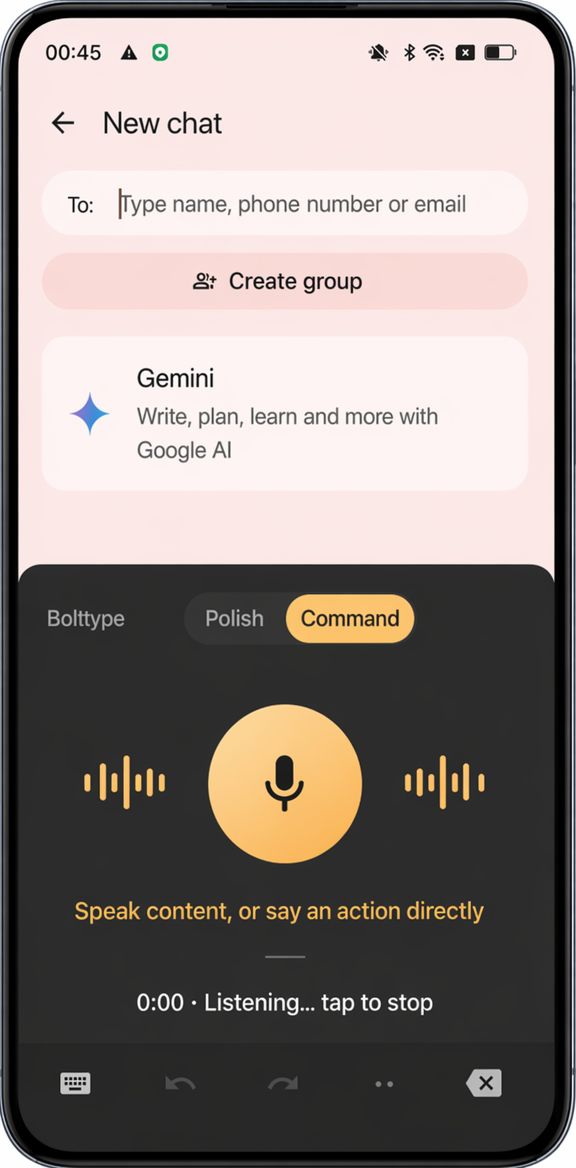
On Android: tap the mic button in the Boltype keyboard. On PC: hold your global shortcut (⌥Space). Focus stays in your app.
02
Say what you mean, naturally. Boltype shows real-time transcription so you can see it's working. No special vocabulary needed.
03
Release the key or tap Insert. AI refines your words and pastes the result into your app instantly. Changed your mind? One undo brings it back.
Boltype replaces your keyboard. Tap the mic, speak, and insert — without leaving your app. Works in any Android app that accepts text input.
Boltype runs as a custom keyboard on iPhone and iPad. Tap mic, speak, insert — seamlessly in any app.
A lightweight menubar app with a global hotkey. Hold to record, release to insert — into any text field on your Mac.
Same lightweight menubar experience on Windows. Hold the global shortcut to record, release to insert anywhere.
"I used to dread long replies. Now I just say it — and it comes out better than I would have typed it."
Free to start · Works everywhere you type